Several months ago, I purchased the uSDR transceiver from Ebay for around $120. I even made a video about it called "The Cheapest HF Radio on Ebay? uSDR Initial Thoughts". Using this radio, I am aspiring to create the least expensive go-kit I can find. I'd like to have something small, functional, and inexpensive. My goal is to prove that you do not have to spend a fortune to have fun in HF portable radio for POTA, SOTA, or whatever.
My latest purchase to go along with this endeavor is another Ebay find. I stumbled across N9SAB's store. He sells under his name "Timortiz" and makes various QRP and QRO dipole and endfed antennas for sale. One such is the "Rugged Nano Dipole". This is a QRP antenna and he makes various versions for bands from 40 meters to 6 meters. I opted for the 20 meter version that ran $36.95. It was a toss-up on which version to buy. I spend most of my time when portable on either 20 or 40 meters but decided on the 20 meter option because of size and weight. Speaking of weight, this thing weighs in at a mere 2.2 oz. It comes with a small soft cloth carry bag, BNC connector, and the antenna ends terminate with some sort of rubberized insulated pieces for attaching rope to secure the ends of the antenna to something (I've been using tent stakes).
I would say that this antenna is quite well made. I've had it out a few times with the uSDR transceiver with great results. I've chased several POTA stations, and last weekend, logged several contacts with the MI QSO party. I definitely recommend this antenna for any portable QRP go-kit and am contemplating which of Mr. Ortiz's antennas I should buy next.
Check out the video below for more of my thoughts on this little antenna.
73 --Bob
Check out these affiliate links below. Using these links to purchase gear will help support the channel.
-Bridgecom Systems: Take a look at their great DMR radios and hotspots
April 9th 2022 was the Panama City Amateur Radio Club's Spring tailgate. The weather was a little cool, but at least the sun was out. Honestly, I think it was perfect for the tailgate. This event was a big step in getting people involved in the club post-Covid. There were several people that had set up portable radio stations, the ARES group was there (many are members of the club) participating in a Saturday excercise, and there were many people that had come from as far away as Pensacola to sell ham related gear. Overall, I would say around 30-40 people showed up for the event. It really was a pleasant surprise to see such interest after a long hiatus of club events and activities.
I had set up my 2 meter packet go-box and IC-705 and had many people stop by and chat about my setup and show interest in packet radio. I fully intended to get a large amount of video of the event, but as I was talking most of the time, I only had a chance to check out a few of the portable radio setups people had brought to demonstrate. The video is below. I hope you enjoy.
Winter Field Day 2022 was the last weekend in January
1/29 thru 1/30 and several local hams Greg N4KGL, Daniel K4MDA, Scott KF7MYF,
Frank KC8VKA, and I camped out at Pine Log State Forest Sand Pond Campground
for the event. The forecast looked like
we were in for a cold weekend, but fortunately, there was no rain in the
forecast. But, I guess that’s what
Winter Field Day is all about. Actually,
I prefer to camp in cold weather, but honestly this weekend came pretty close
to my limit. Especially since I camp in
the back of a pickup truck. Sure, I had
a heated blanket, and it surely beats a tent, but getting out of bed when it’s
too cold isn’t exactly enjoyable first thing in the morning. Fortunately, there is always hot coffee.
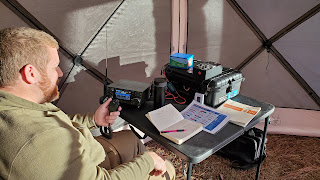
I arrived Friday afternoon around 3:30 and went ahead and
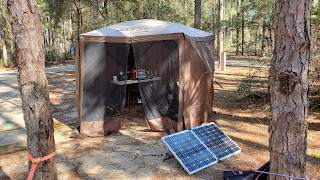
set up my tent. This was new to me. Well, sort of. I have had a 10ft x10ft popup canopy for a
few years now and had a wall kit to give some protection from the wind, but it
was always difficult to set up. For this
event, I used my newly purchased camping cube.
This attaches to the underside of the same canopy I had used in the
past, but not only has 4 walls, but a floor and ceiling and does a better job
of keeping out the drafty winter wind. I
brought along a space heater since the campground has electrical and this
really helped the inside of the cube stay warm.
Later in the evening, a couple of us just sat around my
propane fire pit and chatted. The WFD
event did not start until 1pm Saturday local time, so we did not have the
radios set up yet. Dinner was uneventful
and not filmed. I just had one of those freeze-dried
Mountain House chili mac meals. Once we
all decided to turn in, I retreated to my truck bed accommodations and watched
a couple of episodes of Star Trek on the tablet before falling asleep. That night it cooled off to around 32 degrees
F and inside the camper shell in the truck bed using an electric blanket, I
stayed quite comfortable.
The next morning, I got up around 7am. It was chilly, but nothing warms you up like
a nice hot cup of coffee. After a couple
of cups of coffee, I got breakfast going.
Since Carla was unable to come, I only had to cook for myself. Unfortunately, I forgot a few things for
breakfast. I usually enjoy eggs and
Conecuh sausage for breakfast. If you
have never had Conecuh sausage, I highly recommend it. To my dismay, I left the sausage in the
freezer at the house. So, I had eggs and
hot dogs. It’s a meat right. Well, it’s some sort of meat anyway. I chopped up some yellow bell pepper, onions,
mushrooms to mix in the eggs and sprinkled some cheese on top. It was actually quite good despite the lack
of sausage.
Around 10am, I began setting up the station. First, I put up the antenna. My choice for the event was the SotaBeams
Bandhopper linked dipole. The one I use
is the 20/30/40-meter option. I spend
most of my time on 20 and 40 meters anyway, so this is always a good
option. If I wanted to work other bands,
I do have an Elecraft T1 tuner I could use.
It’s not ideal to tune the dipole because it’s not as efficient, but it
has worked in the past. For power I have
a Bioenno 120-watt solar panel that feeds my Bioenno 40 AH battery. Although we had a lot of shade in the
campground, this provides plenty of power to run my station, laptop, and keep
my accessories powered over the weekend.
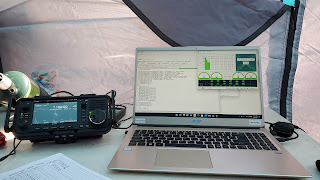
The radio is the Icom IC-705.
I’ve already mentioned the tuner I use, the Elecraft T1. It is a tiny tuner, about the size of a deck
of cards and runs off a 9-volt battery. To
run the digital modes and the logging software I have an Acer laptop with an 8th
Gen I5 Processor. It has been a great
laptop and has more than enough power to run the software needed. My only complaint about the laptop stems from
my decision to upgrade it to Windows 11.
Well, that’s a story for another time.
Getting the radio set up and connected to FLDIGI was a
breeze and went off without a hitch. Well,
that’s a lie. I find that often things are not as easy as they should be. The last time I used this software was with
my FT-817 and getting the settings to work with the IC-705 took some
fiddling. I was running an older version
of FLDIGI/FLRIG that did not support the IC-705. It would work if I selected IC7300 and
changed some settings in the 705. I
decided to download the latest version of FLRIG and found that the IC705 is now
listed in the transceiver list eliminating the need to change the 705’s
settings. I was still fiddling with the
software/radio interface when the event started.
About
45 minutes into the event, I logged my first QSO with a station in Ontario,
Canada. I got a few more QSOs into the
logbook, then went around visiting.
Daniel, K4MDA was my neighbor, and I spent some time in his camp as he
operated at his station. He was using an
Icom IC-7300 paired with a Wolf River Coil.
I think a big part of the event was the socializing. I enjoyed seeing what other hams had brought
and set up. Speaking of other hams, Greg
N4KGL was my neighbor on the other side of me.
He was also using an Icom IC-7300.
His antenna of choice was a wire antenna in an inverted-L running into
the Icom AH-4 tuner. He had a SotaBeams
Bandhopper as well as a backup antenna.
A few sites down was Scott, KF7MYF.
He was operating a Kenwood TS-2000 and a multiband MFJ antenna similar
to a G5RV. He was doing well with PSK
and CW using FLDIGI.
Next to Scott, was
Frank, KC8VKA. He did not do much
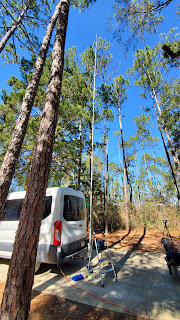
operating, but he had an impressive collection of radio go-boxes and portable
antennas, the most impressive of which was a 50 foot antenna on the trailer
hitch mount of his van. Frank was the
go-to guy for information as there were many newer hams that were interested in
what was going on.
Later that evening, I
cooked up a steak, asparagus, and some sauteed mushrooms, garlic, and onions on
the Coleman stove with a cast iron griddle.
This is one of my favorite meals when camping and you can bet that if I
am camping, this is on the menu one of those nights. I went on and logged a few more QSOs but
after 8pm the temperatures were dropping quickly, and I ended up turning in around
9pm.
I
woke up the next morning to 26 degrees at 6am.
Fortunately, the heated blanket did the trick and kept me comfortable
throughout the night. I got the space
heater fired up in the camping cube immediately. I even brought the Coleman camp stove inside
the cube to get the coffee going. I
opened the windows a bit to keep the carbon monoxide from building up since
there is a big warning on the stove.
Better safe than sorry. We had
been coordinating band usage via 2 meters so that we did not interfere with one
another, but since it looked like I was the first up and on the radio, I had
free range of the bands. 40 meters was
hopping and I enjoyed calling CQ and having quite a few people respond. My neighbor, Daniel and his wife headed out
early. He actually had packed up mostly
the night before. After things warmed up
a bit, I did a little more visiting around the campground. Most of us were starting to pack things up
and eventually Greg N4KGL was the only one left operating.
In
the end, I had only 31 contacts.But, as
I was telling others, to me it’s not about how many QSOs I get in the
logbook.It is more about the experience.Camping, socializing, setting up the
equipment, testing said equipment, trying different modes or whatever.To me, that is where I get the
enjoyment.I had a great time camping
with these hams.I enjoyed chatting and
seeing what others brought and I certainly will be looking forward to our next
adventure out.
I have been running a packet radio node for a few years now, but I am far from an expert. Actually every day, learn something I didn't know the day before. When I got started, I did quite a bit of research on packet radio, but unfortunately I had a hard time finding much. I guess it is simply too old a mode, and furthermore there were no nodes around for me to try. Now that I run a node, I think it is beneficial to get some information out there so others may get inspired to try out packet.
I am going to run through some basic commands to get you connected and exploring your local node.
First, to connect to a local packet node, you need to know a few things. First, you need to know the callsign and ssid of the local node. For example, my local node in Bay County, FL is KK4DIV-7. Next, you need to know the frequency. Again, in the case of my node, I am on 145.05 MHz. You will also need some hardware and/or software. You will need a radio and most mobile radios work very well. You can also use a handheld, but you are limited on power output. Next, you will need either a hardware TNC or a software TNC with a soundcard interface. And last, you will need a computer running some sort of terminal program. For local access to my node, I often use my Win10 laptop with Putty terminal software into my Kenwood TH-D72. I like this little handheld radio due to it's built-in TNC. It keeps things small, portable and simple.
So, what commands do you need to know for the node and what do they do? Here is a list and a brief description of the commands for my BPQ32 Packet Radio Node, KK4DIV-7.
? ... This will list the commands
BBS ... This command will allow the user access into the Bulletin Board System. With the Bulletin Board System, you can send and receive messages, read bulletins from around the world, pass NTS traffic, etc.
CHAT ... This command will allow the user access to the chat server. Often these are linked with other nodes so you can chat with people outside the local area.
RMS ... This will allow the user command line access to the winlink server. It is tricky to access, and will get it's own write-up.
SYSOP ... This will "ring" the sysops computer, open up a chat window on their computer, and allow the user to chat directly with the sysop.
CONNECT ... Will allow the user to connect to other nodes on the "nodes" list or to other stations on the "mheard" list.
BYE ... Will disconnect the user from the node
INFO ... Will display information about the node.
NODES ... Lists the other nodes that the node the user is connected to has heard and has communications with.
PORTS ... List available ports on the node such as the VHF port, HF port, etc.
ROUTES ... Lists direct routes to other nodes usually directly connected via AXIP or VHF packet.
USERS ... lists people currently connected to the node.
MHEARD ... Lists the last seen stations on any given port. For example, MHEARD 3 lists the last seen stations on port 3 (in the case of the KK4DIV-7 node, port 3 is the VHF port).
That's the list of the most common commands for users connected to a node. To see these commands in use, watch the video I put together below.
Saturday, May 14th, I knew at least one club member was going out to the park to participate in the Second Saturday Sprint (please see the G+ community: https://plus.google.com/u/0/communities/104840420363990807712 or this youtube video: https://youtu.be/Eo2nwwhfjAs). Not having much to do myself, and since I had already cut the grass earlier in the morning, I loaded up my radio gear and headed out to the park as well. I didn't participate in the sprint, but I did set up and make a few contacts while I was there.
When I arrived at the park, Greg, N4KGL, and Cory, N4UVR were already there. Cory was set up and running PSK, and Greg had just set up his station as well. I socialized a little, talking to Cory and Greg. Cory had set up his homebrew magnetic loop as well as a vertical whip/coil antenna.
Greg was running his Elecraft KX3 and a Bravo 7K for an antenna.
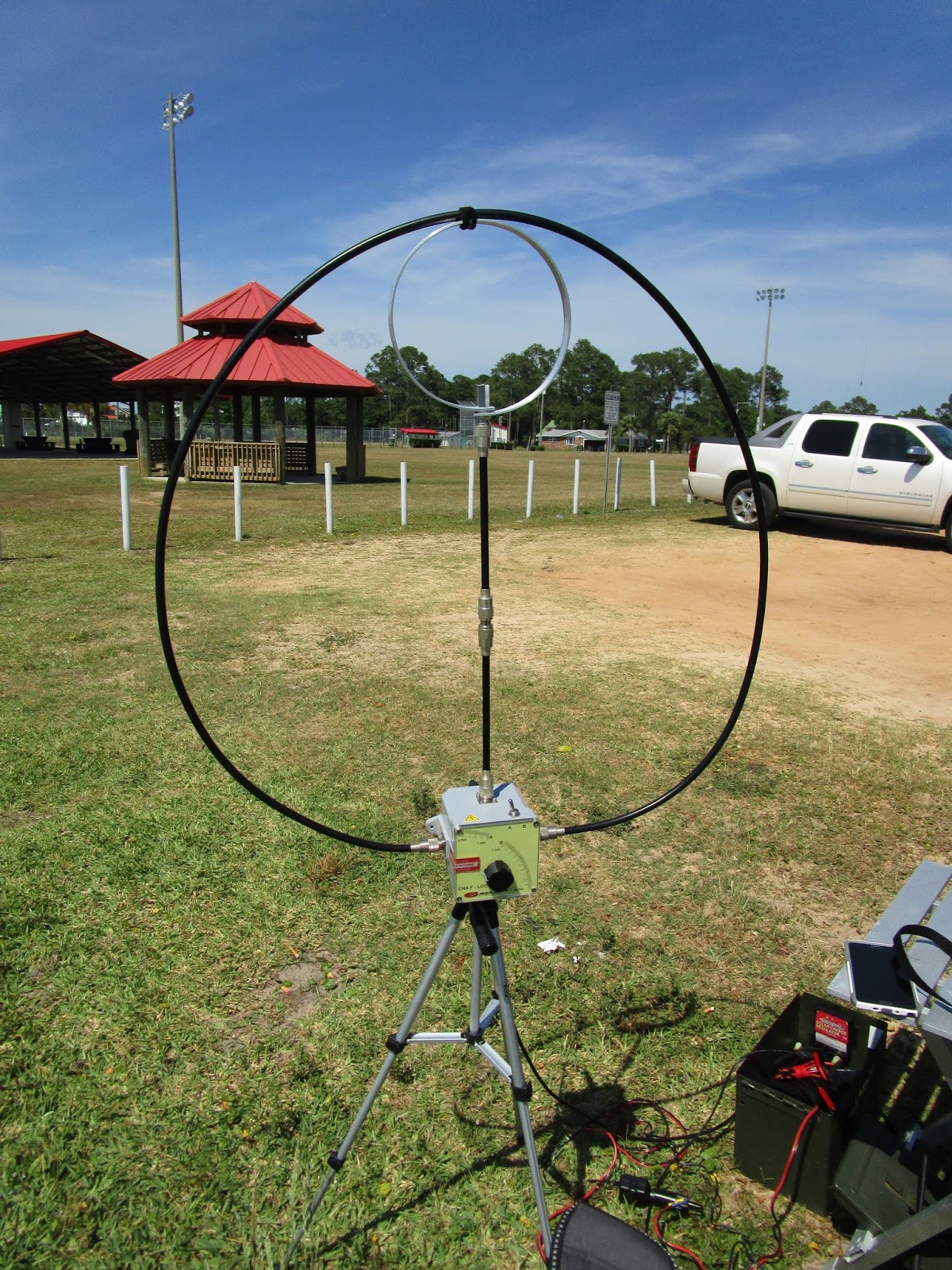
My setup was a Yaesu FT817nd running 5 watts on internal battery and the Chameleon F-Loop antenna. I can't brag enough on this antenna for ease of setup, portability, and performance for it's size. The folks at Chameleon have themselves a winner with this one.
Even though I did not spend a lot of time on the radio, I did manage to make a few contacts on 20 meters for the little time I was at the park. First was K4RC, the Williamsburg Area Amateur Radio Club in Williamsburg, VA. They were operating National Parks on the Air from park designation AA14 which is the Jamestown National Historic Site. Next was W5HB in Winslow, AR. He was participating in the Arkansas QSO party. And, lastly, was WA0DX, the Ottumwa Amateur Radio Club in Ottumwa, IA. He had activated an island for the US Islands on the Air awards program. He was at IA010, Turkey Island.
Overall, I had a good day at the park. The weather was great although a little windy. I would have had some video, but the wind pretty much wiped out the audio. Until next time, everyone...73!!
--Bob
KK4DIV